
It’s 11 p.m. and a water heater just split in a garage two miles from your shop. The homeowner grabs a phone, types “emergency plumber,” and calls one of the first three names on the map. If you’re not one of them, that job goes to someone else.
SEO for plumbers is the work that puts your business in those first results: a complete Google Business Profile, a page for every job you want, steady reviews, and a website that makes calling you easy. You can do most of it yourself, and almost all of it is free.
The short version: The map results decide who gets the call, so fix your Business Profile first, then build service pages and collect reviews every week.
This guide walks through every step in the order a small plumbing company should do it, with real search data, blog topics that bring calls, a 90-day plan for a 3-truck shop and a rule for when paid ads make sense.
How SEO for Plumbers Turns Searches Into Calls
Plumbing customers rarely browse. They search, scan the map, and call. Your job is to show up in two places: the map results, which come from your Google Business Profile, and the regular results below them, which come from your website.
Google says local results are mainly based on relevance, distance and prominence (Google’s tips to improve your local ranking). Relevance is how well your profile matches the search. Distance is how far you are from the searcher. Prominence is how well-known you are, and Google says more reviews and positive ratings can help.
Google is also clear on one thing: there’s no way to pay for a better local ranking. Paid ads sit above the map, but they’re a separate product (more on that later).
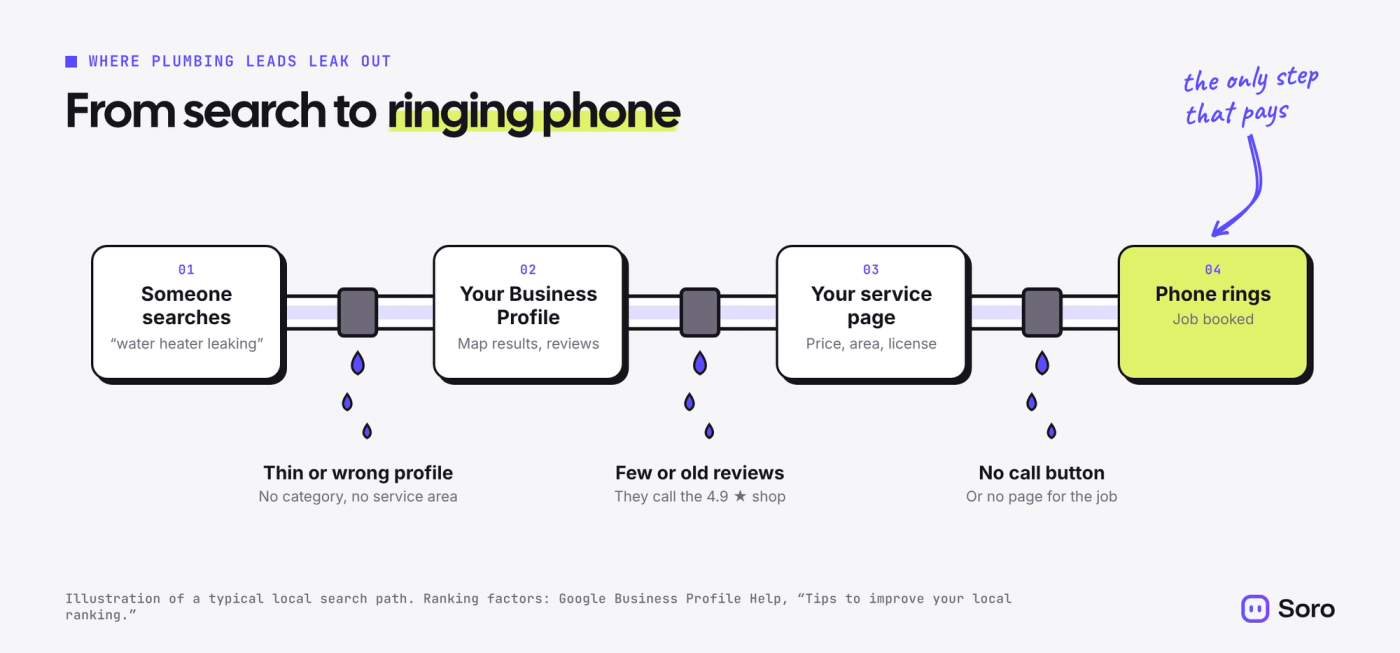
Think of it as a pipe from the search to your phone. Every weak spot leaks calls to the shop next door.
Find the Plumbing Searches That Turn Into Jobs
Start with what people type when water is on the floor. Most plumbing searches fall into three groups, and each one needs a different kind of page.
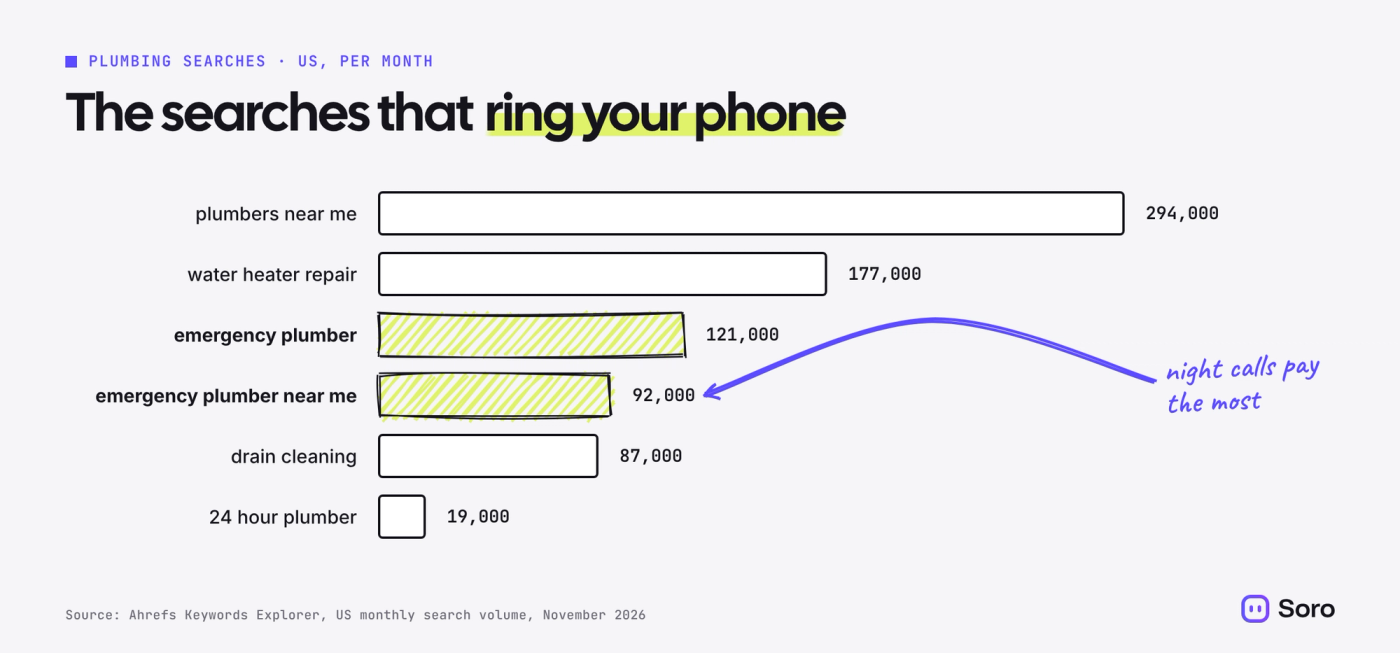
The numbers show where the money is. Ahrefs data puts “plumbers near me” at about 294,000 US searches a month and “emergency plumber” at about 121,000, plus 92,000 more for “emergency plumber near me.” That’s roughly 2 emergency searches for every 5 “near me” searches. They’re urgent, ready-to-call searches, and the map results answer most of them.
| Search type | Example | Where you win it |
|---|---|---|
| Near me and emergency | “emergency plumber near me” | Google Business Profile and map results |
| Service plus town | “water heater repair Plano” | A service page on your website |
| Questions | “why is my water heater leaking” | A short answer article on your blog |
How do I find keywords for my plumbing business for free?
Use three free sources. Your Google Business Profile performance report shows the searches people used to find you. Google Search Console shows which searches already bring up your website. Google’s own autocomplete shows how people phrase things in your area. Write down the 10 jobs you most want, then the way customers describe them on the phone.
Set Up Your Google Business Profile Like a Dispatcher Would
Your profile is the front door for almost every emergency search. Google says customers are 2.7 times more likely to consider a business reputable if they find a complete profile, and 70% more likely to visit (Google Business Profile Help). Here’s what complete means for a plumber, with the menu names from Google’s own Business Profile playbook for service businesses.
- Pick “Plumber” as your primary category. Add secondary categories only for work you really do, such as drainage service.
- Set your service areas. Select Edit profile, then Location, then Edit next to Service area. Google allows up to 20 areas, set by city or postal code, and the whole area shouldn’t be more than about 2 hours of driving time from your base (Google’s service area rules).
- Hide your home address. If customers don’t visit your shop, Google says to remove the address and list only your service area.
- List every service. Select Edit services and add each job with a plain description. Keep phone numbers and prices out of custom service names, since Google rejects those.
- Set honest hours. If you take after-hours calls, show it. If you don’t, don’t mark yourself open 24 hours. An angry 2 a.m. caller writes reviews too.
- Add real photos. Select Photos, then Add photos. Google’s playbook says businesses with photos get 42% more requests for directions and 35% more website clicks. Show uniformed techs, branded trucks and finished jobs.
- Turn on chat if you’ll answer it. Select Edit profile, then Contact, and pick WhatsApp or text in the Chat section.
For every field, setting and update rhythm, use our Google Business Profile optimization checklist.
Should I put keywords in my business name?
No. Google’s Business Profile guidelines say your name should match your real-world business name, the one on your trucks and invoices. Changing “Riverside Plumbing” to “Riverside Plumbing Best Emergency Plumber Tulsa” breaks those rules and can get the profile suspended. It also looks spammy to the person deciding who to call.
Build One Page per Service, Plus a Real Emergency Page
Your website wins the searches the map doesn’t: “water heater repair” plus a town, “sewer line replacement cost,” “tankless water heater installer.” A single “Services” page listing 20 jobs can’t rank for all of them. One page per job can.
Start with your three best-paying jobs. For most shops that’s water heaters, drain and sewer work, and repiping or leak detection. Each service page needs:
- A title that says the job and the town, like “Water Heater Repair in Tulsa | Riverside Plumbing.”
- Signs you need it, written the way customers describe them: “no hot water,” “rusty water,” “a puddle under the tank.”
- A price range or starting price. Customers want a ballpark before they call, and Google’s playbook recommends adding pricing to your services.
- The towns you cover and how fast you usually get there.
- Proof: your license number, real job photos and a review or two about this job.
- A tap-to-call button at the top on mobile. Most of these searches happen on phones.
What should an emergency plumber page include?
Put the phone number at the very top as a tap-to-call button, then say plainly when you answer and how fast you usually arrive. Add what to do while waiting, like shutting off the main water valve. Only claim 24/7 service if someone really picks up at 3 a.m.
That last line matters. Emergency searches are some of the biggest in plumbing, and the person searching picks fast. A page that loads quickly and puts your number first gives them nothing to scroll past.
Do plumbers need a page for every city?
Only for towns you really serve, and only if each page says something different. Google’s spam policies treat near-duplicate city pages that funnel visitors to one place as doorway abuse. A good town page mentions jobs you’ve done there, the local housing (older homes with galvanized pipes, say), your drive time, and reviews from customers in that town. If you can’t write that, skip the page and list the town on your service pages instead.
Make Your Site Fast and Tell Google You’re a Plumber
A homeowner standing in water won’t wait for a slow page. Most of these searches happen on phones, so check four things.
- Test your speed. Run your homepage and best service page through Google’s free PageSpeed Insights. The Core Web Vitals report in Search Console shows which pages are slow for real visitors. On trade sites, huge uncompressed job photos are the usual cause.
- Check it on your own phone. The call button should show without scrolling, text should be readable without zooming, and forms should be short. If you can’t book yourself in 30 seconds, neither can a customer.
- Use HTTPS. If your browser shows “Not secure” next to your web address, ask your host to turn on a free SSL certificate.
- Add local business schema. Schema is a few lines of code that tell Google your business name, address, phone and hours. Google’s LocalBusiness documentation says to use the most specific type you can, and schema.org has a Plumber type. Most WordPress SEO plugins can add it for you. Keep the details identical to your Business Profile.
Will schema markup get me into the map pack?
No. The map results come from your Business Profile, not your website code. Google says structured data helps it understand a page, but it doesn’t guarantee any search feature. Add schema because it’s cheap and keeps your details consistent, then put your real effort into the profile and reviews.
Get More Google Reviews, Every Single Week
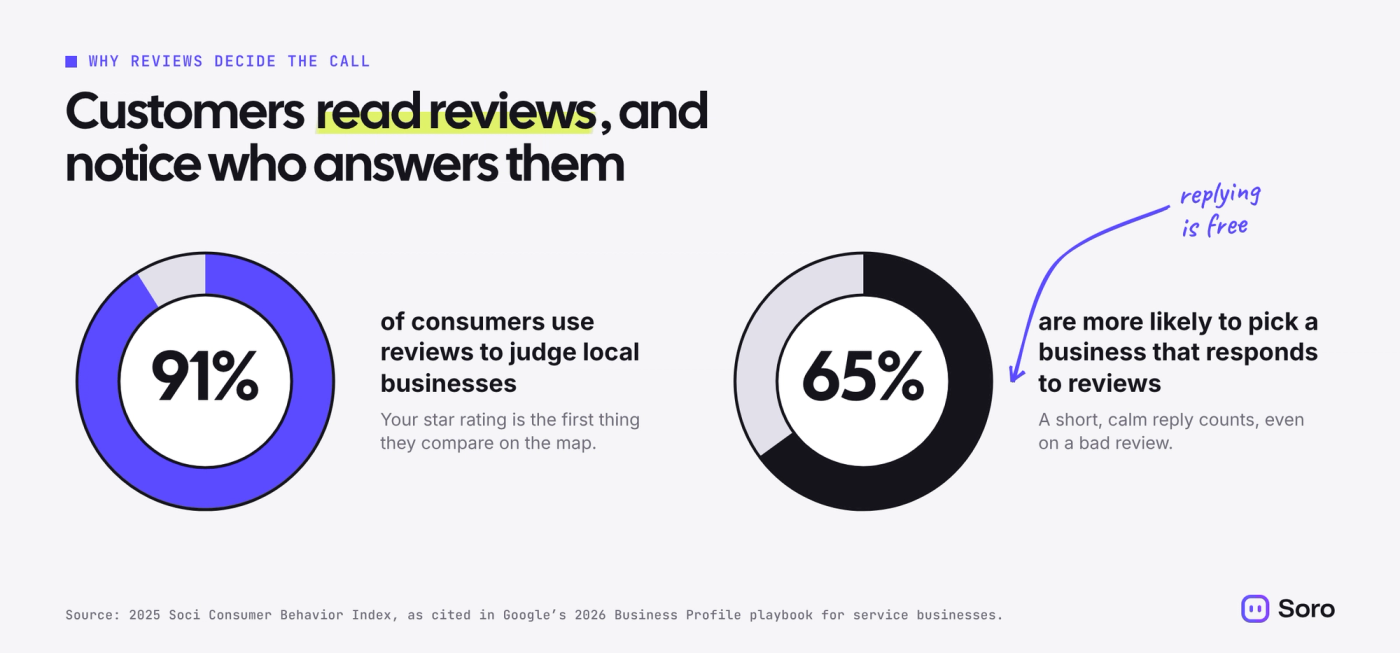
Reviews are the part of prominence you control. Google says more reviews and positive ratings can help your local ranking, and they decide the click too. Google’s playbook cites a 2025 Soci study: 91% of consumers use reviews to judge local businesses, and 65% are more likely to pick one that responds.
The system that works for busy crews is simple:
- Ask the same day. Text your review link when the job is done and the customer is happy. Here’s how to create a Google review link and QR code.
- Make it routine. Put the ask in your job-close checklist, so every tech does it, not just the owner.
- Reply to every review. Thank good ones by name and job. Answer bad ones calmly and offer to fix it.
- Don’t pay for reviews or only ask happy customers. Google’s review policies don’t allow incentives or selectively asking for positive reviews.
A steady trickle beats a burst. Ten reviews a month for a year looks far more real than 100 in one week.
Fix Your Listings and Earn Local Links (Without Buying Any)
Your business name, address and phone number should match everywhere: your website, Google, Bing Places, Apple Business Connect, Yelp, the BBB and any trade directories. Mismatched numbers confuse customers and give Google mixed signals about who you are.
Links from other local sites help your website’s prominence. For plumbers, the easiest ones come from relationships you already have:
- Suppliers and manufacturers that list certified installers.
- Builders, realtors and property managers you work with.
- Your chamber of commerce and local trade associations.
- Youth sports teams or community events you sponsor.
Never buy links or swap them in bulk. It’s against Google’s spam policies, and it’s the fastest way to waste a year of work.
Answer Homeowner Questions With Short Blog Posts
Before they call anyone, a lot of people ask Google how to fix it themselves. Ahrefs data puts “how to fix a running toilet” at about 196,000 US searches a month and “how to unclog a toilet” at about 60,000. Most of these questions have low keyword difficulty, so a small local site can rank for them.
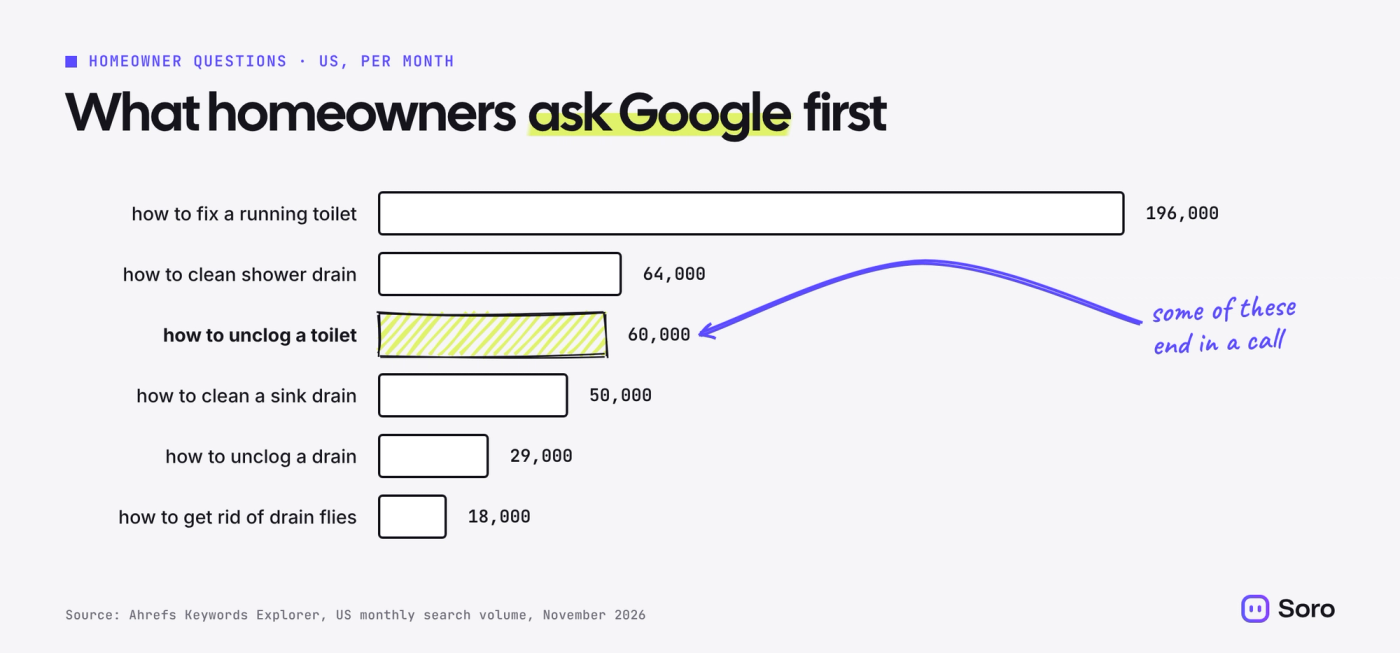
Don’t chase every DIY search, though. Someone replacing a toilet seat will never call you. Pick problems that often end in a call, because the fix didn’t work or because it’s risky to try.
What should a plumber blog about?
Write about the problems your phone already rings for, in the words customers use: a water heater leaking from the bottom, a sewer smell in the basement, low water pressure, a toilet that won’t stop running. Each post gives the safe first steps, the signs it needs a pro, a price range and your number.
| Post idea | Why it can bring a call |
|---|---|
| Water heater leaking from the bottom: what to do first | A leaking tank often means a replacement job |
| Why does my basement smell like sewage? | It can point to a drain or sewer line problem owners can’t fix |
| How to unclog a toilet (and when to stop) | Big search volume, and a failed DIY attempt turns into a call |
| Low water pressure in one faucet vs the whole house | Whole-house pressure loss can mean a leak or a failing valve |
| Frozen pipes: how to thaw them safely | Seasonal spike, and a burst pipe is an emergency job |
Link each post to the matching service page and end it with your phone number. One useful post a week beats ten thin ones. Our guide to writing content that ranks covers the process step by step.
Expect fewer clicks than the search numbers suggest. Google can answer simple how-to questions right on the results page, so the visitors you do get are the ones who still need help. Those are exactly the people who call.
Show Up in AI Answers, Too
More people ask Google’s AI Overviews and ChatGPT for “a good plumber near me.” The good news: Google says there are no special requirements to appear in AI Overviews or AI Mode. Pages just need to be indexed and eligible for a snippet, and normal SEO applies.
For a plumber, that means the same basics: a complete Business Profile, service pages that answer real questions in plain text, and steady reviews. AI tools pull from the same places customers check.
Track Calls, Not Rankings
Rankings move depending on where the searcher stands, so a plumber checking from the shop sees a different map than a customer across town. Our guide on how Google Maps ranking works explains why. Track the things that pay instead:
- Business Profile performance: calls, website clicks, direction requests and the searches people used.
- Search Console: which searches show your website and which pages get clicks.
- Your own job tickets: ask every caller “How did you find us?” and write it down. It’s free and more honest than any dashboard.
How long does it take? We can’t promise a date, and nobody honest can. Profile fixes can show up in weeks. New service pages usually take months to climb, and town pages longer.
What We’ve Seen Across Soro’s Plumbing Customers
Soro writes and publishes articles for plumbing companies, so we see which sites start ranking and which stay stuck. The plumbers whose articles rank best tend to have three things in common.
| What they had | Why we think it helps |
|---|---|
| A WordPress website | Articles go live with titles, images and links intact, so nothing breaks between writing and publishing |
| A domain older than 3 months | Google has already crawled the site, so new pages get found and indexed faster |
| A Google Business Profile that’s set up | Google can tie the website to a real, verified local business |
This is a pattern we’ve noticed across our own customers, not a controlled study. We don’t think domain age is the reason by itself. Our read is that older sites have simply had time to get crawled and indexed, while a 2-week-old domain still starts from zero.
What to take from it: if your website is brand new, don’t expect blog posts to rank in the first few months. Spend that time on your Business Profile and reviews, which can start working in week one, and let the site build history in the background.
Worked Example: A 3-Truck Plumber’s First 90 Days
Say you run a 3-truck shop in Tulsa. You have a basic website, a Business Profile you claimed years ago, and 23 reviews. The phone is busy in winter and quiet in spring. Here’s how we’d spend the first 90 days, at about 3 hours a week.
| Weeks | What to do | What you should see |
|---|---|---|
| 1–2 | Fill in every profile field, set service areas, add 20 photos | More profile views and calls in the performance report |
| 3–6 | Write 3 service pages and an emergency page | New pages indexed in Search Console |
| Every week | Text a review link after each job, reply to every review | About 2–4 new reviews a week |
| 7–10 | Fix listings on Bing, Apple, Yelp and the BBB | Same name and number everywhere |
| 11–13 | Add 2 town pages and 2 answer posts | First impressions for town and question searches |
The numbers in the last column are targets for this example, not promises. A shop in a crowded city will move slower than one in a small town.
Should Plumbers Pay for Local Services Ads While SEO Grows?
Local Services Ads sit above the map, and you pay per lead, like a call or message, not per click. They’re available for plumbers. Our comparison of Local Services Ads and your Business Profile covers the badges and costs.
Here’s a simple rule:
- If the phone is quiet and you need calls this month, run Local Services Ads on a small budget while you fix your profile.
- If you already get steady calls, put the time into reviews and service pages. That traffic doesn’t stop when the budget does.
- If you have fewer than 20 reviews, fix that first. Ads and organic results both reward shops customers trust.
What to Do This Week
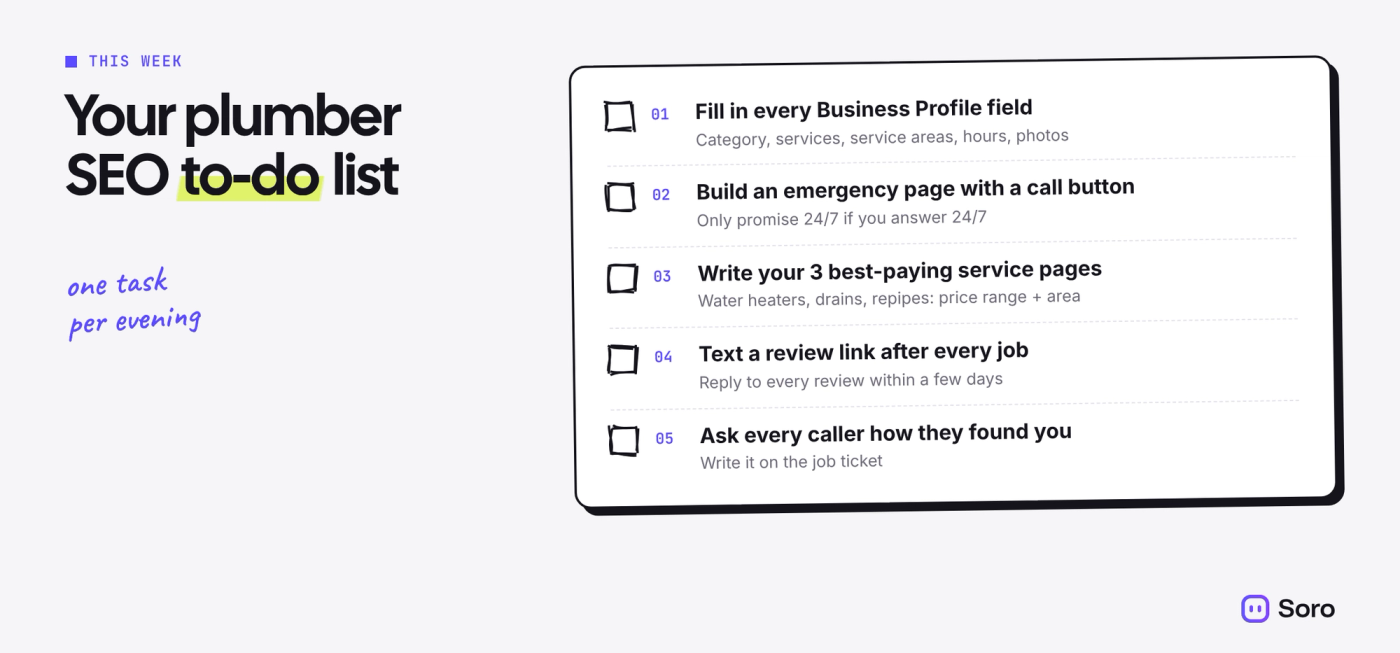
- Fill in every Business Profile field tonight. Category, service areas, services, hours and at least 10 real photos.
- Build your emergency page. Tap-to-call at the top, honest hours, and what to do while waiting.
- Write your three best-paying service pages. Signs, price range, towns, license number and a call button.
- Start the review habit. Text your review link after every job and reply to every review.
- Ask every caller how they found you. Write it on the job ticket. In 3 months you’ll know which of these steps pays.