
If you want your business to have solid ground in Google searches, you need to know about Google Business Profile optimization. It means filling out your Google listing properly so it shows up for the right people and is convincing enough that potential customers click. Most of this is a one-time job you can complete in a single sitting. The rest is a weekly habit that doesn’t require additional human resources or technical skills. In this guide, we’ll gloss over every item, explain what really affects your position on Google Maps, and flag the most common mistakes.
Google Business Profile Optimization Checklist: Starting Point
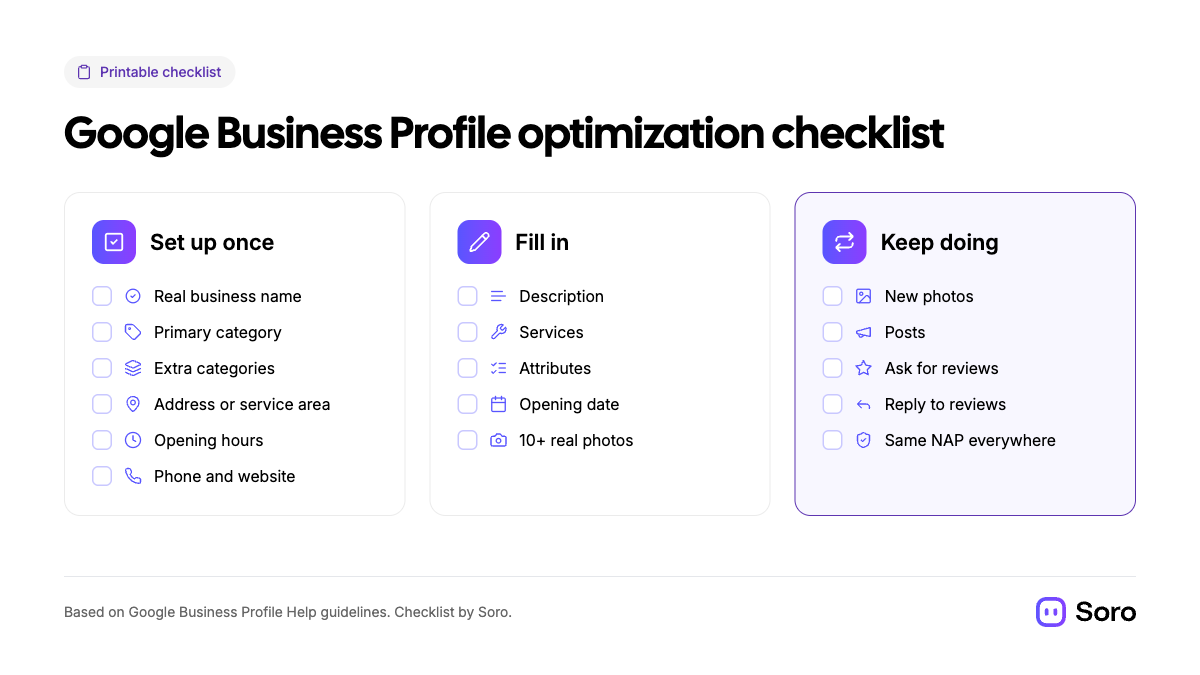
If we’re talking Google Maps SEO, it’s essential to sketch out what could be the business’s top priorities. Below is a full Google Business Profile optimization checklist at a glance. Some are one-time jobs, while the third column shows what you need to keep doing weekly or bi-weekly, at least. Each item will be explained further below.
What Actually Makes a Business Rank in the Google Map Pack?
Google ranks every result based on its carefully refined algorithm. Local results rely on three key factors:
- Relevance (How Well a Business Profile Matches What Someone is Searching for)
- Distance (How Far Each Business is From the Customer Who’s Making the Search)
- Prominence (How Well-Known the Business is)
This is not a far-fetched assumption or a generalization that’s just thrown together. Google Business Profile Help lists this officially. They also state that “there’s no way to pay for or request a better local ranking”. Use the visual guide below to understand things more quickly.
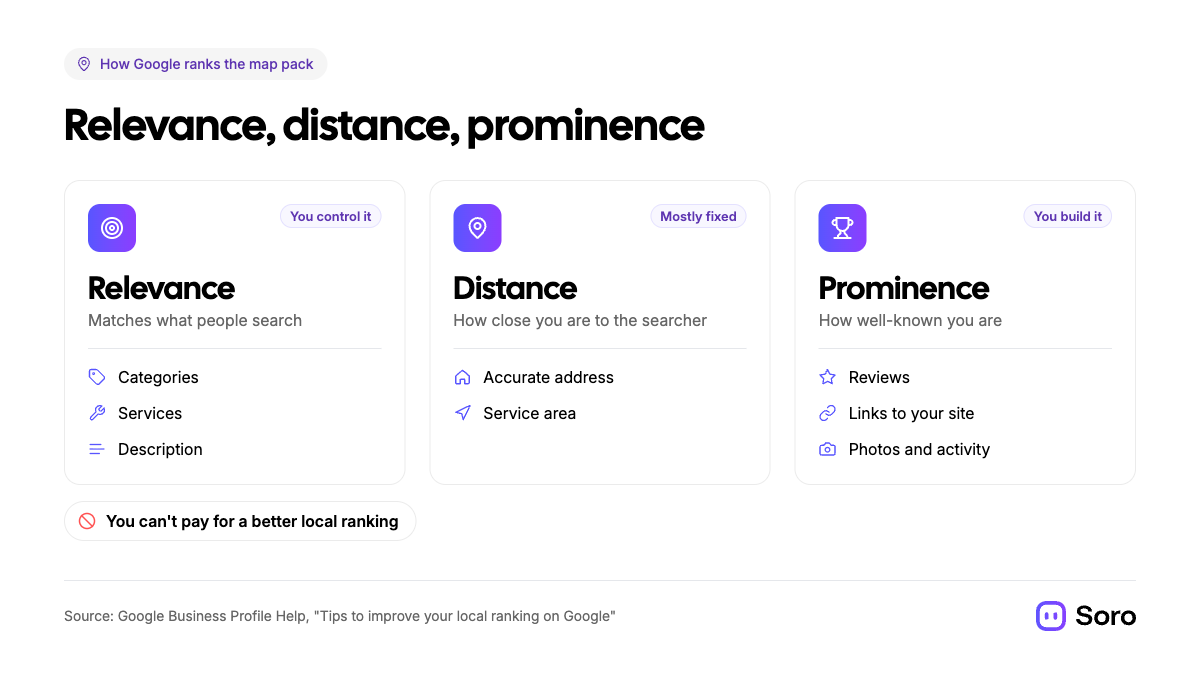
With these things clear, it’s a must to understand what you can and what you can’t control. For example, you can’t move your shop closer to every customer, so that stays fixed. However, every business owner can work on relevance and prominence. This works for plumbers, legal service providers, travel agencies, and everything in between. Independent data backs this up.
In Whitespark's 2026 Local Search Ranking Factors survey of 47 local SEO experts, the top factors impacting Map Pack positions were:
- Primary Category
- Proximity to the Searcher
- Keywords in the Business Name
- Physical Address in the Searcher’s City
- Being Open at the Time of the Search
Below is a great chart, which displays the weight of each factor and can help understand how to optimize a Google Business Profile the right way:
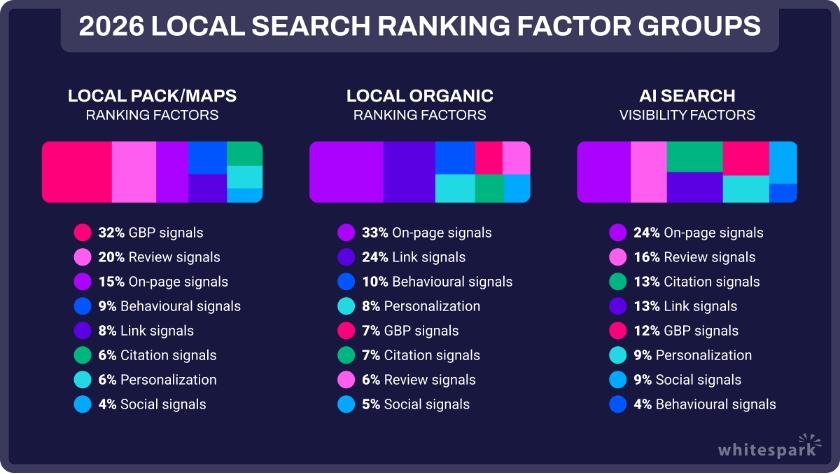
Image source: Whitespark — 2026 Local Search Ranking Factors
Keep in mind – this is an opinion from 47 experts, not official data from Google. With that being said, it’s a long-running, widely cited survey on Google Maps SEO, lining up with the Search Engine’s own advice.
Now that we have the theory covered, we can move on to the practical part of the guide. We’ll look at things step-by-step, following the order in which they should be tackled.
Choose the Right Google Business Profile Categories
Once inside the Google Business Profile manager, pick the most specific category that best describes what your business is. Only add extras that genuinely apply once the first part’s covered. Let’s use an example:
- Your Primary Category. One in the first field. Choose it cautiously. Google lists things along the lines of “Nail salon” instead of “Salon”.
- Additional Categories. Google allows adding up to 9 of these, but their own guidelines recommend “using as few as possible”, and to choose ones that could complete a sentence “This Business IS a…”, not “HAS a…”.
- Don’t Use Categories as Keywords. A restaurant that has a bar isn’t a bar unless that’s what it is.
One word of advice: editing categories will likely trigger re-verification, so settle on them before you change, and read our piece on How to Verify Your Google Business Profile for a more in-depth look.
2. Should You Put Keywords in Your Business Name?
Short and clear answer: NO! The name of a business on Google (according to their own guidelines) should match the real-world name exactly as it appears on storefronts, business cards, websites, etc. For example, “Greg’s Plumbing” or “Omega BMW Repair - Pasadena” would be appropriate if that’s consistent with what you put in your e-mail signatures or quotes.
Don’t include unnecessary information. If you do, that could result in the suspension of your Business Profile. The guidelines list (visualized below) explains what belongs in the name and what doesn’t.
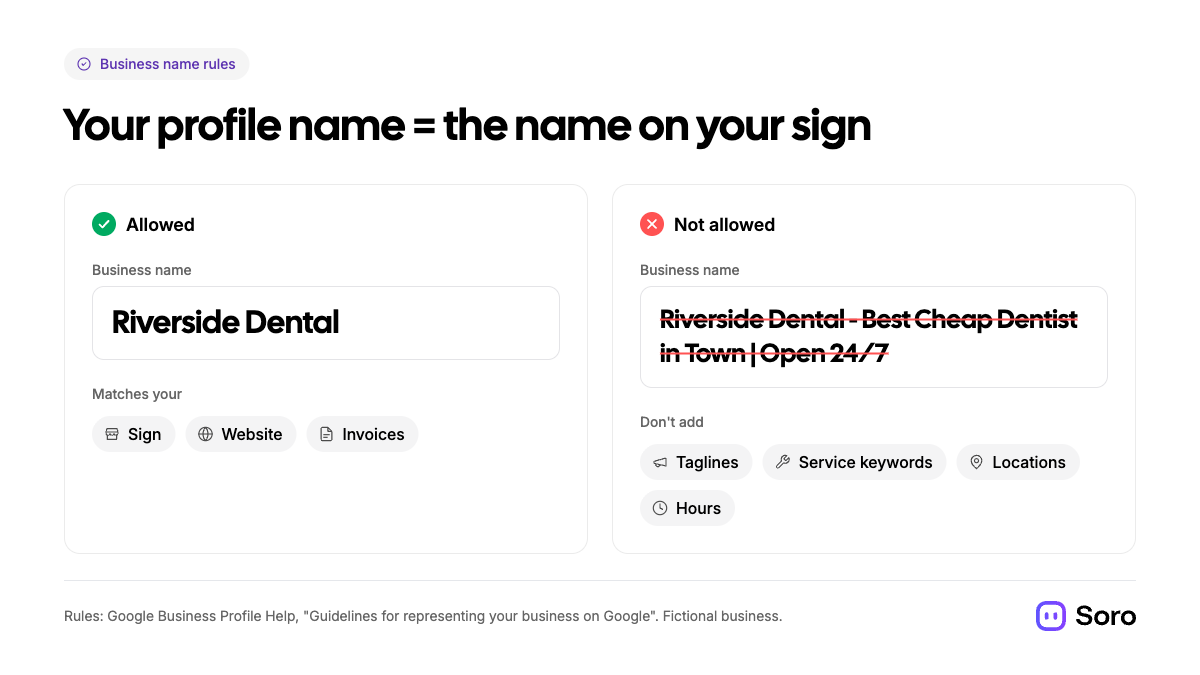
Marketing taglines, service/product or location info, opening hours, and other unnecessary additions, as well as ALL CAPS for the title, shouldn’t be used. You may have read that keywords in the business name help rankings, and experts rank it highly, but that’s a slippery slope. Stuff the name with unnecessary info and lead your GBP into suspension. Only update the name here if your real signage and website change. That’s Google Business Profile optimization 101.
3. Write Simple, Engaging Descriptions
We mentioned this before, but let us repeat the most important element – Write for Your Customers, Not for Rankings. Experts rank keywords in the description at #171 of 187 local ranking factors (Whitespark). Furthermore, a specific test conducted by Search Engine Land discovered that the description field’s contents had no impact on Map Pack positions (albeit it’s older research from 2020).
Here’s what Google says works best:
- <750 Characters
- No HTML or URLs, or links of any kind;
- Don’t mention special promos, prices, or sales, as they are for posts.
A good rule of thumb for when you try to optimize a Google Business Profile is to see whether the description answers 3 core questions:
- What You Do?
- Who You Do It For?
- Where You Do It?
Use simple words, and mention the main services and the areas you cover naturally. So, to answer a common question, “How do I add keywords to my Google Business Page properly?” – through the right categories, a list of services, and a clear description. You definitely don’t do it by just repeating frequently searched terms.
4. Add Services, Hours & Attributes
- Services – you can choose from suggestions and add custom ones. Various tests, like Sterling Sky’s, for example, prove this correlates with improved rankings. Start with suggestions.
- Hours & Special Hours – keep it accurate and add special hours for holidays or temporary changes. If you work by appointment only, don’t list hours at all.
- Attributes – specifics like wheelchair accessibility or online booking integration can help, because people search for those attributes.
- Address or Service Area – if you go to your clients, show your area coverage, not a street address.
- Opening date – the month and year when you started.
5. Upload Real Photos, and Keep Adding Them
Google recommends adding photos or videos regularly to boost rankings in search results. Use real imagery of your projects or team, and/or premises, as stock or unoriginal footage doesn’t work well. Some technical guidelines:
- JPG or PNG format up to 5 MB size
- 720x720 px recommended size
- Videos: <30 s long and <75 MB at 720p or higher
Since they need to be verified, new images and videos can take up to 48 hours to appear.
6. Post Updates, Offers & Events
Post to put news, promotions, and events right on your listing. There are three separate types of categories for these posts. Make sure the claims are realistic. While opinions on the importance of regular updates vary from expert to expert, an active profile with fresh offers definitely doesn’t hurt when a potential customer is mulling options.
Our guide to Google Business Profile posts has 12 examples by trade that could point you in the right direction. However, we know that for a busy business, consistent posting outputs might be low on the priorities list. If that’s you, Soro Local is one option, capable of posting regular updates on your Business Profile on complete autopilot.
7. Get Reviews & Reply to Them
When it comes to Google Business Profile optimization, you have to pay attention to reviews and how you manage them. As it turns out, positive ratings are a big factor for Prominence, a key ranking factor. Experts agree and claim that review signals are second only to profile signals when it comes to TOP Google Maps SEO. How can your plumbing business, garden supply shop, or legal office get more reviews?
- Ask Every Customer. Share your review link on receipts, emails, and a counter sign. Send a polite inquiry after a job well done or a product sold. Our guide to creating a Google review link and QR code shows how.
- Never Offer Incentives or Ask Only Happy Customers. Both are banned under what Google calls Fake Engagement Policy.
- Reply to Every Review. Good or bad, show both the customers and Google’s robots that you value people’s feedback. Soro Local can also handle review replies on your profile.
8. Keep Your NAP (Name, Address & Phone Number) Consistent
As the world’s most popular Search Engine, Google builds a picture of your business from more than just the profile on the platform. It also crawls (i.e., reads) content from the web and licensed 3rd-party sources. Make sure your business’s name, address, and phone number (NAP) are identical on every directory you’re listed in.
Short Summary on How to Rank Higher on Google My Business: Keep the Profile Active
The most honest answer on improving your ranking on Google is to follow the checklist above. It will get you to the starting line. Once you cross it, consistency should deliver tangible results and keep you in a better spot. Google says customers are 2.7 times more likely to consider a business reputable if they find a complete profile, which also increases organic visits by 70%.
Remember that changes don’t show up overnight. Keep going at it, since regular updates are one of the key parts of how to optimize a Google Business Profile and rank higher on Google as a business.Most of this checklist is DIY, so work through it yourself before you pay for local SEO services. For the bigger local picture beyond your profile, see Local SEO for Small Business: The Only Guide You Need.
FAQ
How Do I Optimize My Google Business Profile?
First, choose the most specific primary category and use your real business name. Then, write a clear description that is <750 characters and is aimed at real people. After, add services, hours and real photos. Finally, keep posting updates and replying to reviews.
Which Google Business Profile Category Should I Choose?
The most specific one that describes what your business is. Examples: “Suspension repair”, not just “car repair”. Add extra categories only if they genuinely fit.
How Long Does Google Business Profile Optimization Take to Work?
Some changes will appear within a couple of hours. Others could take weeks or months, according to Google. New photos, for example, need 24-48 hours to show.