
Knowing how to respond to Google reviews is one of the simplest ways to win customers who are still deciding. Searchers read your replies, often just as closely as the reviews themselves. This is why it’s important to know how to reply and react, whether you’re a legal advisor, a plumber, a small car dealership, or anything in between.
Our guide will show how to reply in a few clicks and how to do it quickly. In addition, we’ll share review response templates for good, mixed, negative, and even fake reviews, which you can copy and make your own. All of this should help your business grow on Google and increase brand prominence, which leads to better rankings.
How to Reply to Google Reviews in 5 Steps
First things first – you need a verified Google Business Profile before you can reply. Here’s a guide on how to get it verified. Once that’s taken care of, do this:
- Go to Your Business Profile. Search for Your Business Name on Google While Signed In.
- Select ‘Read Reviews’.
- Next to the desired review, select ‘Reply’.
- Write your reply.
- Click ‘Reply’ again to post it.
Google will check every reply against its policies before letting it go live. While it usually takes <10 minutes, some reply reviews could take up to 30 days, so stay patient. Your reply will appear as the business, not under your personal name or account.
Worth mentioning are the facts that reviewers get a notification and can still update their review afterward, while the business can edit or delete their reply at any time.
Should You Respond to Every Google Review?
This is a good question with a simple answer: ‘Yes’. Google advises this, too, by saying “reply to reviews and share your perspective”, and customers agree with the search giant.
BrightLocal carried out a survey in 2026 that revealed:
- A staggering 89% of consumers expect business owners to respond to reviews.
- A huge portion, 80%, say that they’re more likely to trust a business that replies to all reviews.
- That percentage drops to 45-47% for businesses that reply only to positive or negative feedback.
Look at the chart below to get a clearer picture of consumer sentiment toward reviews:
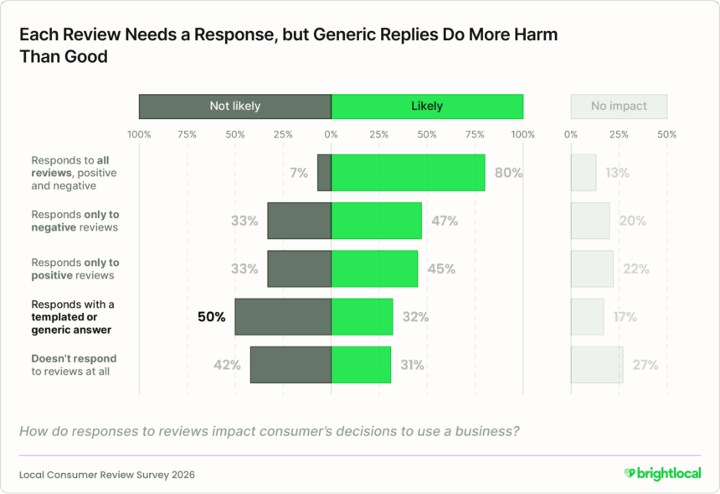
Image source: BrightLocal: Local Consumer Review Survey 2026
Since replying to everything is the right call, checking should become a habit. Yet, with a large volume of reviews coming in, or other work piling up, it may be easy to fall behind. If that’s where you find yourself, Soro Local is an option that could handle replies without you needing to oversee everything. The tool replies to every review on your Google Business Profile for you.
How Fast Should You Reply?
Sooner than most owners would think. Once again, we turn to the same 2026 BrightLocal survey. It also found that:
- 19% of consumers expect a reply the same day they post a review. That’s up more than 3x from last year, when this figure was only 6%.
- 81% of consumers expect a reply within one week.
Google's tips say the same thing more gently: "A prompt response shows that you value your customers' feedback." There’s a helpful illustration from the survey on how to manage Google reviews, and how quickly to respond, below:
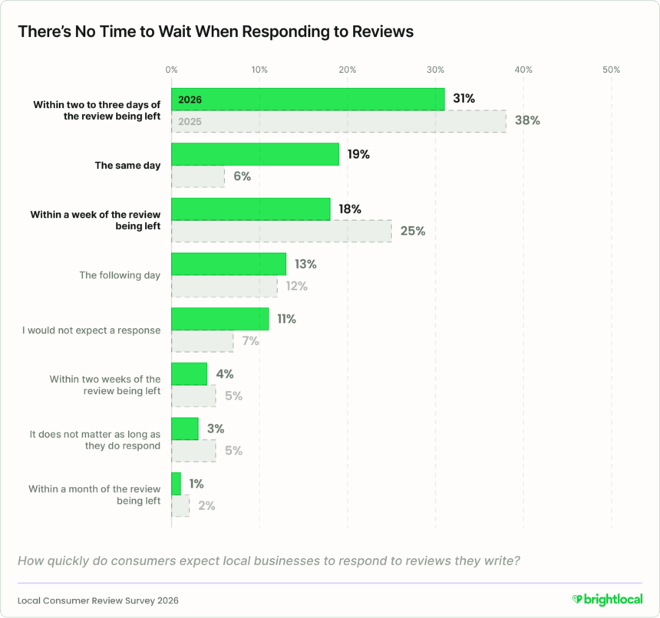
Image source: BrightLocal: Local Consumer Review Survey 2026
From this, you can set up a realistic goal: check your reviews every day or two and reply within 2-3 days at most.
Review Response Templates for Good and Bad Reviews
While templates for replying to reviews can be very useful, a word of advice beforehand.
Generic or templated replies make 50% of consumers unlikely to choose a business (BrightLocal). Google also suggests that focusing on helpful updates, not the same “thank you” skeleton, is most useful.
Thus, treat these review response templates as a skeleton. Fill every [bracket] and add one detail only you’d know. Alternatively, use them as a jumping-off point to make templates your own.
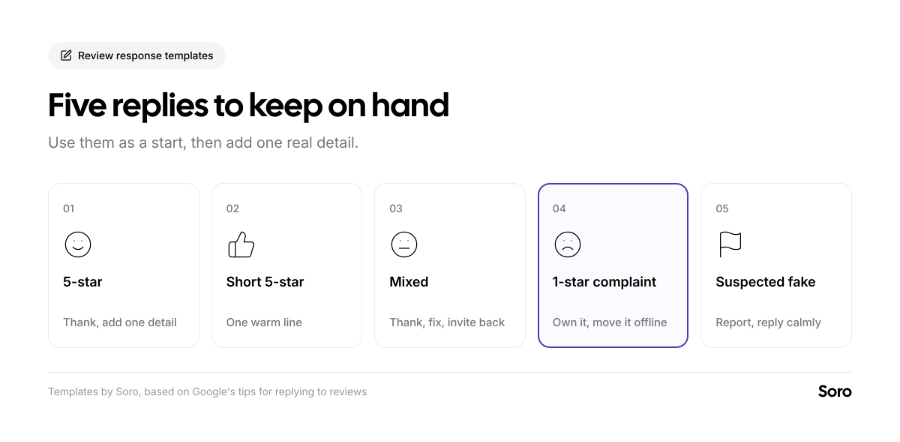
5-star Review
Template: Thanks so much, [first name]. We're really glad [specific detail from their review, such as "the new boiler is running quietly"]. [Team member] will be happy to hear it too. See you next time. [Your name], [business name]
2. Short 5-star Review (stars-only or just a few words)
Template: Thank you for the five stars, [first name]. We appreciate you choosing [business name] for your [service].
3. Mixed Review
Template: Thanks for the honest review, [first name]. We’re glad [what, if anything, went well], and sorry that [something went wrong]. We’ve [change you made or solution you implemented]. Next time, ask for [team member name], and we’ll make sure it’s right. [Your name]
4. 1-star Review With A Real Complaint
Template: [First name], I'm sorry about [the specific problem]. That isn’t the standard we want to set. [One sentence on what you’ve done or will do to address it]. We’d like to put this right, so please call me at [phone] or email [address] when it suits you. [Your name], [role]
5. Suspected Fake Review
Template: Hi [name], we take every review seriously, but we can't find a record of [a visit or job] under this name. If we've missed something, please contact us at [phone or email] so we can look into it. [Your name], [business name]
How to Respond to Negative Reviews
What matters most is knowing how to respond to negative reviews. Potential customers read and focus on those replies to judge how you’d treat them if a problem were to occur.
Google notes that negative reviews “aren't necessarily a sign of poor business practices,” and that constructive replies may even encourage the customer to update their review. The instructions below highlight how to react:
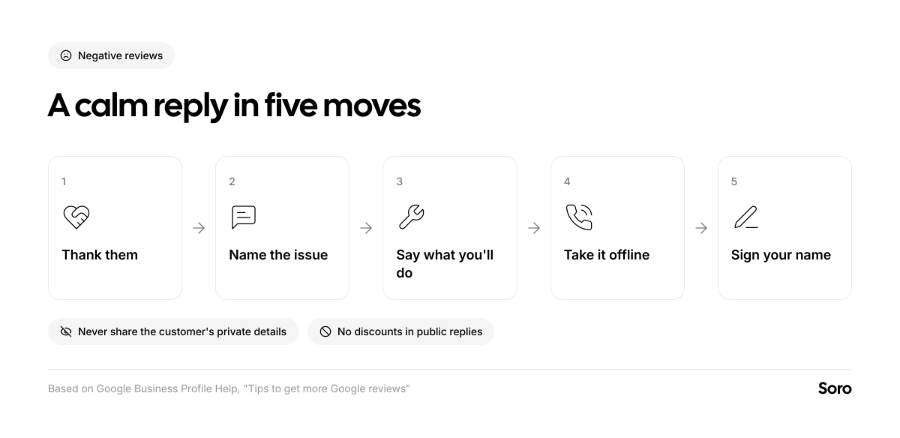
- Stay Calm & Brief. Write the reply, wait 30-90 minutes, and only then post it, when the emotions aren’t at their highest and you can provide a short and simple reply.
- Protect Privacy. Never, under the most stressful situations, share a reviewer’s private information. Also avoid taking it personally or making it about yourself. Your business’s reputation comes first, and the responsibility still falls on the company, not an individual.
- Be Honest About Limits. While apologizing for what went wrong is the right thing to do, you shouldn’t take responsibility for what’s outside your control. That would mislead customers about your capabilities and responsibilities.
- Move it Offline. Share a phone number or email, and discuss further details there.
- Don’t Trade Favors for Edits. Offering anything in exchange for changing or removing a review counts as fake engagement under Google's content policy.
Follow these points, and you’ll know how to respond to negative reviews.
How to Respond to a Fake Google Review
Fake reviews are very frustrating. A jealous competitor, a troll, or someone with ill intentions could harm your reputation. Responding to fake criticisms is a key part of how to manage Google reviews, because they can pop up from time to time.
When you think or know the review is fake, check your records one more time. A harsh review isn’t fake by default, and Google is clear on this, instructing businesses not to report reviews just because the business disagrees with or dislikes it. If it breaks Google's policies, for example, spam, a conflict of interest, or someone who was never a customer, that’s a different story. You should report it. Here’s our chart on the right order of action when you spot a fake Google review:
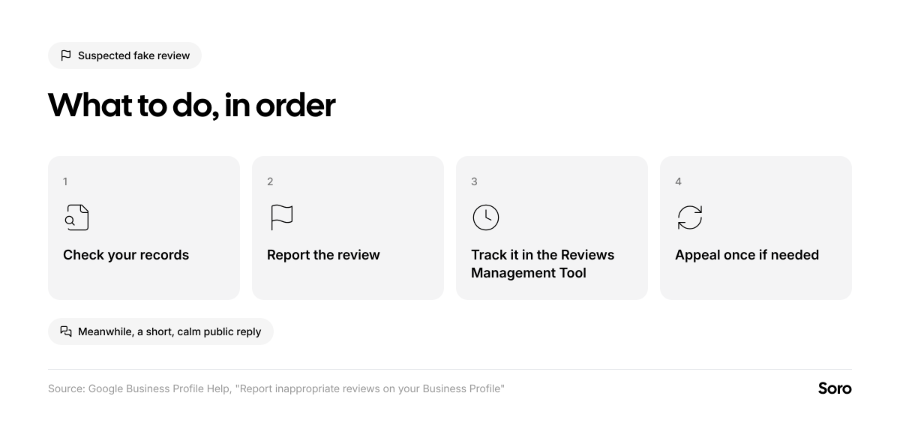
- On your Business Profile, select Read reviews, then Report next to the review, and pick a reason.
- Check back to see the progress of the report in Google’s Reviews Management Tool. Evaluations can take up to several days.
- If Google concludes that there’s no violation, but you disagree, there’s an option to submit a 1-time appeal.
A short, calm reply like template 5 (while you wait) shows potential customers that you take feedback seriously. If you’re dealing with a wave of fake reviews tied to extortion demands, Google has a separate reporting process for them.
Do Review Replies Help Your Ranking?
Not exactly, and be very careful if anyone promises they do. While the search platform lists review responses among the tips for improving local ranking, the reasoning is leaning in a different direction. Google says, “positive reviews and helpful replies can help your business stand out.” This says nothing about moving up in the SERP or Map Pack.
Experts agree replies matter more for winning customers than they do for rankings. We’ve been quoting that figure quite often, but it’s relevant here, too - Whitespark's 2026 Local Search Ranking Factors survey found that replying to most reviews ranks as the 122nd of 187 factors for the map pack overall, in terms of importance. At the same time, it’s the 17th most effective at converting searches into customers. So, the conclusion is clear – know how to respond to Google reviews, and you should get more customers.
If you’re more interested in knowing what moves rankings, see how to rank higher on Google Maps.
How to Manage Google Reviews Week to Week
All you need is a simple routine to keep Google reviews from taking over your entire week. Here’s a simple guide on managing Google reviews for any small or mid-sized business:
- Check for New Reviews Every 1-2 days. Reply to new ones ASAP; within a few days is good enough.
- Keep Your Best Replies as Templates. Rotate between a few of them to not make it seem like everything’s copy-and-paste.
- Report Everything That Breaks Google’s Policies. Track the situation with each report in the Reviews Management Tool.
- Keep Reviews Coming in. Remember to continue asking every customer for their opinion the same way.
- Reuse Your Best Reviews. Google allows you to copy a link to a review and share it elsewhere.
All Things Considered – a Short Summary on Responding to Google Reviews as a Business
Reviews and replies sit alongside the rest of your profile, covered in our Google Business Profile optimization checklist. While you shouldn’t see them as a guaranteed path to better SEO and higher rankings, consistently replying could nudge a potential customer who's on the fence in the “right” direction. Don’t forget to prepare templates. Don’t reuse them blindly. Utilize these templates as a starting point for faster responses, since speed matters to many clients.
FAQ
How Do I Write a Reply to a Negative Review?
Thank them, identify the specific problem, and say what you’ve done or will do. You can also share your phone number or email to sort it out privately. The No. 4 template from above gives you wording on how to respond to Google reviews with a negative message.
Should I Respond to Every Google Review?
Yes, Google recommends it, and independent research reinforces that way of thinking. A total of 89% of consumers expect the business to respond, and replying to both good and bad reviews looks more trustworthy.
How to React to a Fake Google Review?
Our review response templates give you a good starting point. If it breaks Google's policies, report the review, but make sure to double-check your records first. In the meantime, post a short, calm reply. Don’t accuse the reviewer or confront them in public.
Can I Edit or Delete My Reply?
Yes. Open ‘Read Reviews’ from your Business Profile. Then, select ‘Edit’ under your reply or ‘Delete’ if you want to remove it.