
If you run an online store, some of your next customers won’t click around your site themselves. They’ll send an AI agent to do it. On November 13, 2026, OpenAI launched ChatGPT Wallet, which lets its dots agents pay at your normal checkout on the shopper’s behalf. ChatGPT Wallet setup on your side takes about 15 minutes, and it builds on what came before: Shopify stores can already sell in ChatGPT, with checkout on the store’s own site.
The short version: ChatGPT Wallet needs no integration from you, but your firewall or fraud tools can quietly turn these AI shoppers away, so a 15-minute check is worth it.
Below: what ChatGPT Wallet is, the 3 places agent orders get blocked, the setup for each, and what we’d do now while volume is still small.
What Is ChatGPT Wallet?
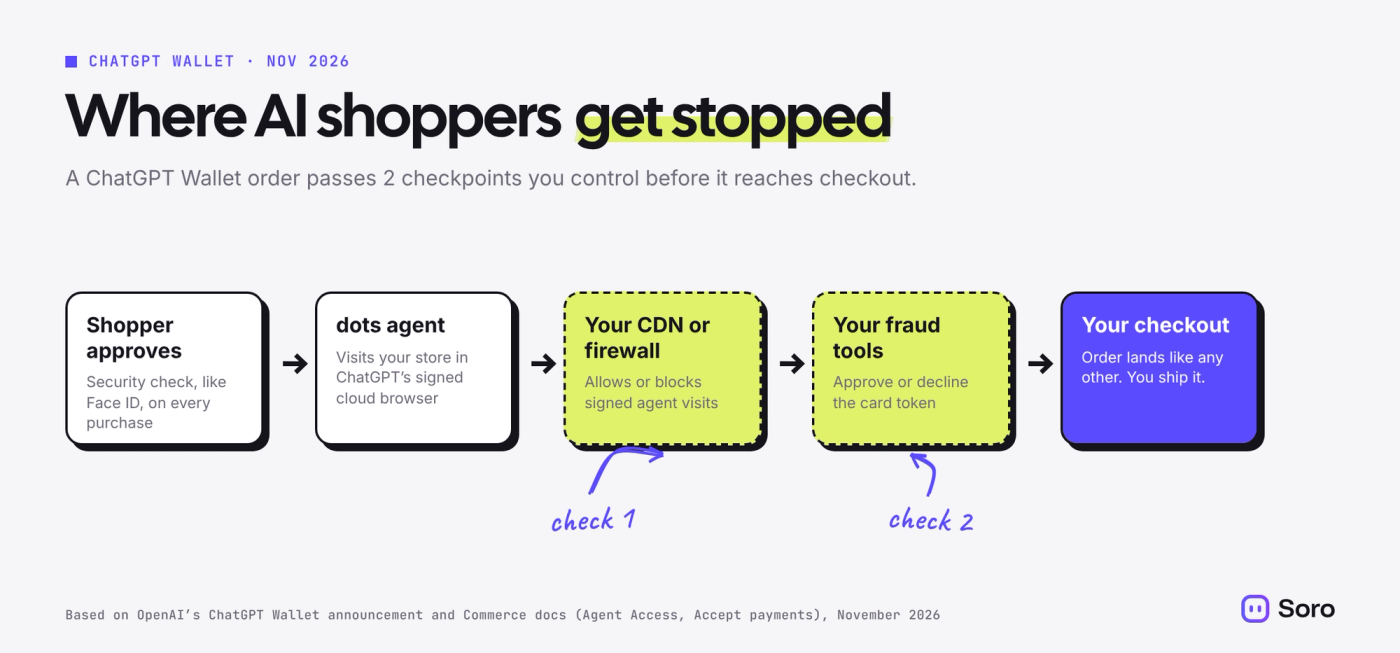
ChatGPT Wallet is a payment feature for dots, OpenAI’s personal AI agents. A shopper adds a card once. When a dot finds what they want, the shopper reviews the order and approves it with a security check, such as Face ID or a fingerprint. The dot then pays through your regular checkout.
According to OpenAI’s announcement, Wallet is built with American Express, Mastercard and Visa. You never see the shopper’s real card number. The card network gives you a token that stands in for it, and it runs through your existing payment setup.
For now, it’s limited. OpenAI says Wallet is available first to ChatGPT Pro subscribers in the US, through dots. It hasn’t said when it will reach other plans or countries.
Here’s who does what in a Wallet purchase:
| Step | Who handles it |
|---|---|
| Finding and comparing products | The shopper’s dots agent |
| Approving the purchase | The shopper, with Face ID or a fingerprint |
| Payment | A card network token, through your normal checkout |
| Shipping, returns and support | You |
| Fraud decisions | You and your fraud tools |
Where AI Shoppers Get Blocked
OpenAI’s merchant docs say plainly that no Wallet-specific integration is required. The risk is the opposite: tools you set up to stop bad bots can stop good agents too. There are 3 places this happens.
- Your CDN or firewall. OpenAI’s merchant checklist puts it simply: check whether your CDN or firewall blocks verified ChatGPT browser visits. The agent signs its requests with a standard called Web Bot Auth, so security tools can tell it apart from scrapers. But your rules still decide whether signed agents get in.
- Your fraud and risk tools. An order placed by an agent from a cloud browser can look unusual to fraud software. OpenAI warns that its cloud browser can set off these systems by accident and cause purchases to fail. It’s adding a header with shopper signals, such as country and time zone, that risk tools can read. Ask your provider whether it uses them.
- Checkout bot protection. Shopify Plus stores can schedule bot protection that blocks known bots at checkout during big sales. Shopify hasn’t said how it treats signed agents, so test before your next drop.
ChatGPT Wallet Setup: Allow the Agent Without Opening the Door to Every Bot
You don’t need to turn off bot protection. You need one exception for verified ChatGPT agent visits. OpenAI’s Agent Access guide lists the setting for each major provider:
| If your site uses | What to do |
|---|---|
| Cloudflare | Set "dots, OpenAI" to Allow in your AI crawler and agent access policies, or allow detection ID 129220581 in a WAF custom rule |
| Akamai | Create a custom bot category with the verified bot "ChatGPT Agent" and set it to Allow |
| HUMAN | Turn on the "ChatGPT Agent" known-bot rule and set it to Allow |
| Vercel | Nothing, unless your own rules block it |
| Another firewall | Verify the request signatures and add an allowlist exception for signed visits |
On a hosted platform like Shopify, you may not control a CDN at all. In that case, the settings that matter are your apps: any bot-blocking, fraud or anti-scraping app you installed. Check each one for an AI agent or verified bot setting.
ChatGPT Wallet Payments: What Changes in Your Checkout
A Wallet order arrives like a normal card payment, with one difference. According to OpenAI’s payments guide, you receive a network token instead of the shopper’s real card number. Four things follow from that:
- Use the token for that order only. OpenAI says not to save or reuse it for a separate purchase. The shopper agreed to one transaction, not a stored card.
- Subscriptions need clear consent. Recurring charges are allowed only if your checkout supports them and the shopper agrees, following your payment processor’s rules for merchant-initiated payments.
- Repeat-customer matching works differently. OpenAI says to use the Payment Account Reference (PAR) to link the token to the shopper’s card account. If your fraud or loyalty rules match customers by card, ask your payment provider whether it supports PAR.
- Support stays with you. OpenAI says your business handles the order, fulfillment, customer support and fraud decisions. An order placed by an agent is still your order, with your shipping times and your return policy.
Say you run a Shopify candle store with a “subscribe and save” app. A Wallet shopper buys one gift set. Our read: that order should go through as a one-time purchase, and your subscription app should never try to charge that token again. Check how your subscription or one-click reorder app handles new card types before agent orders pick up.
One more thing to tell whoever answers your inbox: shoppers approve each Wallet purchase with a security check, so we expect “I didn’t order this” messages to be rare. Treat any that come in like other disputed orders, using your normal refund and fraud process.
Robots.txt Doesn’t Decide This
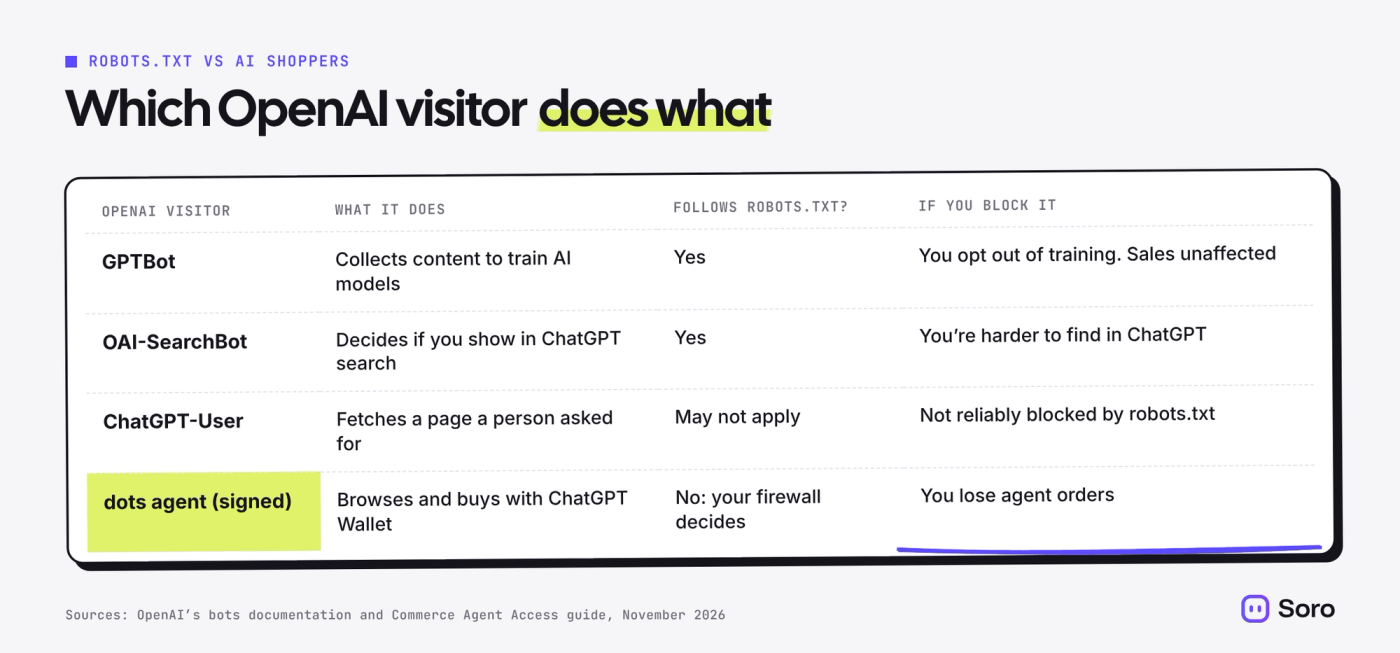
A common belief: if you block GPTBot in robots.txt, you’ve decided how ChatGPT treats your store. You haven’t. OpenAI runs separate bots for separate jobs:
- GPTBot collects content for training AI models. Blocking it opts you out of training, not out of sales.
- OAI-SearchBot decides whether your pages can show up in ChatGPT search. Block it and you’re harder to find.
- ChatGPT-User fetches pages when a person asks ChatGPT to. OpenAI says robots.txt rules may not apply to it.
The Wallet agent’s signed browser visits are separate again, and they’re handled at the firewall level. So the setup that makes sense for most stores: allow OAI-SearchBot, decide on GPTBot however you like, and allow signed agent visits.
Why AI Shopping Matters for Your Store’s Visibility
Getting found in ChatGPT used to be the whole game. Our guide to claiming your business in ChatGPT Business Hub covers that part. Wallet adds the next step: the agent can now finish the purchase too.
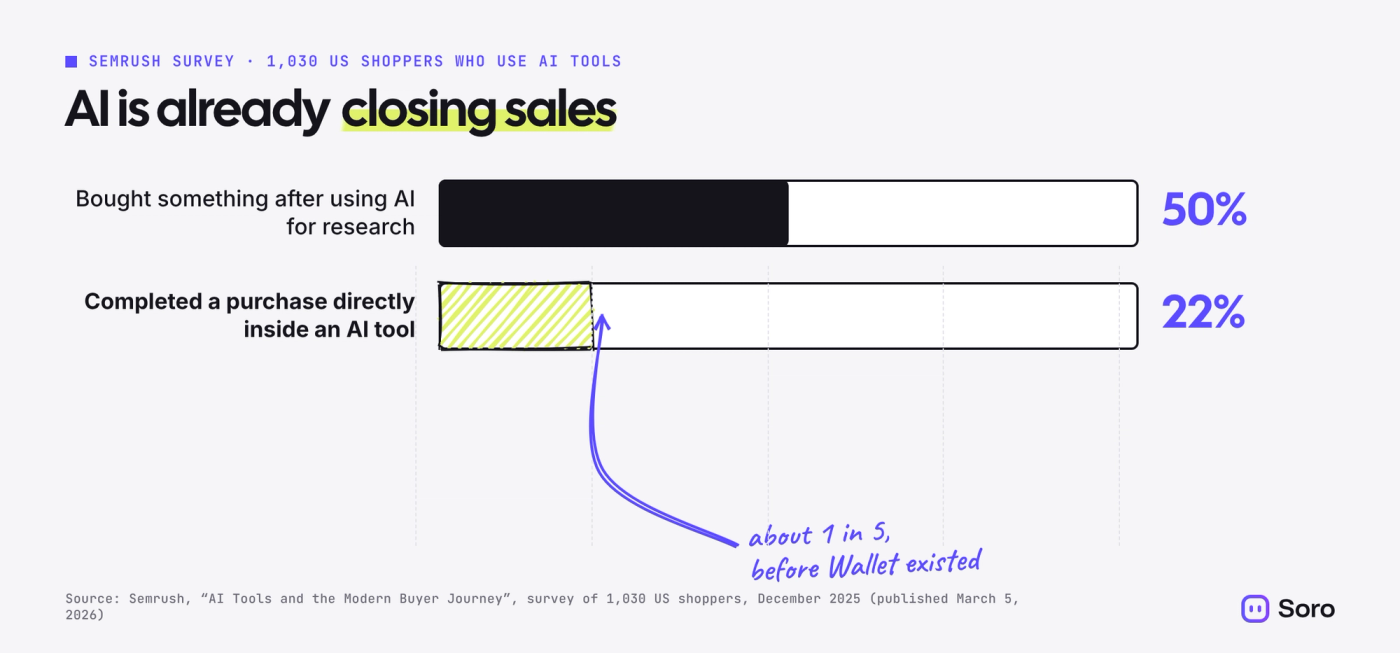
Shoppers are already moving that way. In Semrush’s survey of 1,030 US shoppers who use AI tools, 50% had bought something after using AI for research, and 22% had completed a purchase directly inside an AI tool. That’s about 1 in 5.
Wallet volume will be small at first. It’s US-only, Pro-only and a limited rollout. Our read: the check is cheap, and the cost of skipping it is invisible. If your firewall turns away an agent, no one tells you about the sale you didn’t make.
Shopify and ChatGPT: Your Products May Already Be Listed
Shopify’s agentic storefronts put eligible products in ChatGPT by default if you sell to US customers, even if your store is based elsewhere. Checkout happens in your own store, and Shopify charges no extra fees beyond payment processing. To qualify, your terms of service, privacy policy and return policy must be filled in under Settings > Policies. You can see or turn off ChatGPT’s access under Sales channels > Agentic. If you’re new to how Shopify handles search, our look at whether Shopify is good for SEO is a good starting point.
What It Means for Soro Customers
No action is needed in Soro. Wallet works through your store’s checkout, not through your content.
What still matters is what agents and shoppers read before they buy: clear product pages and helpful articles that answer real questions. Soro keeps publishing SEO articles to your Shopify, WordPress, Webflow, Wix, Ghost, HubSpot or Notion site. The practical check: make sure your site is connected and recent articles are live and linked to the right products.
What to Do Next
- Find out who runs your bot protection. Check whether you use Cloudflare, Akamai, HUMAN, Vercel or a bot-blocking app. Your host or developer can tell you in one email.
- Allow the signed ChatGPT agent, not every bot. Use the setting from the table above. Keep your other bot rules as they are.
- Email your payment and fraud providers. Ask one question: how do you score purchases made by AI agents like ChatGPT’s dots? Ask whether they read the new signals OpenAI sends.
- Check your Shopify setup. Fill in your policies under Settings > Policies, and review the ChatGPT channel under Sales channels > Agentic. Details are in Shopify’s help page on selling in ChatGPT.
- Keep product pages and content complete. Agents compare stores the way a careful shopper does: price, shipping, returns, specs. Fill in the gaps, and keep publishing helpful articles. Soro can write and publish those for you automatically.