
If you're asking "why is my business not showing up on Google?", the answer can usually be found in a short list of common causes. Luckily, most of them are fixable within a single afternoon. The tricky part is understanding that “showing up on Google” means two different things with different fixes for problems. There’s the Google Business Profile (GBP) on Maps and in the Map Pack, and your website in regular results. Our guide helps you figure out which one’s broken, then walks through the most common causes and fixes.
First, Work Out Which Problem You Have
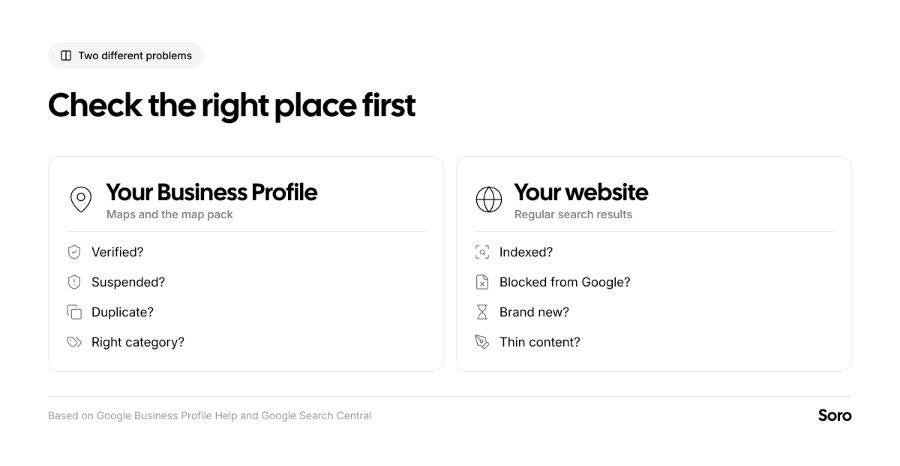
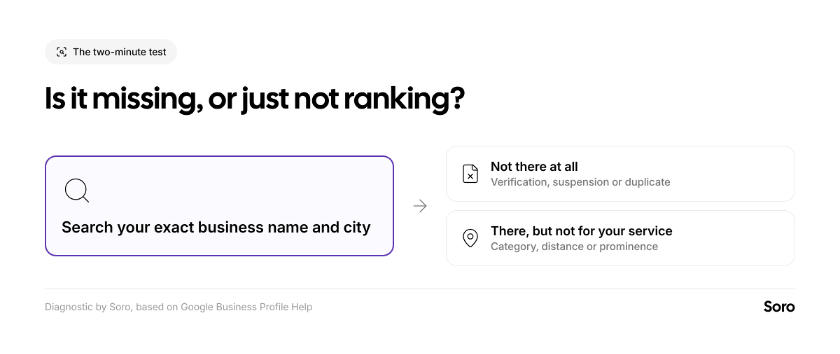
To start, conduct a small 2-minute test. Search your exact business name and city on Google, and then do the same on Google Maps. The visual below also lists common reasons to answer the question: “Why is my business not showing up on Google?”
Let’s work out things one by one.
- Your profile doesn’t appear at all. That’s definitely a GBP problem. Check verification, possible suspension, and duplicates first.
- It appears for your name but not in local searches like “landscapers near me”. Means your profile exists, but isn’t ranking. First, look at the category, distance, and reviews.
- Your profile seems fine, but the website never appears. It’s an apparent website issue. Skip straight to the ‘Website’ section below.
Why Is My Business Not Showing Up on Google Maps?
If the problem is related to Google Maps, the business listing itself is the likely issue. Here are 7 common reasons why the brand isn’t popping up to you or your clients.
1. Your Profile Isn't Verified
Google is very direct about this. We quote: “Only verified businesses can show their business info on Maps and Search.”
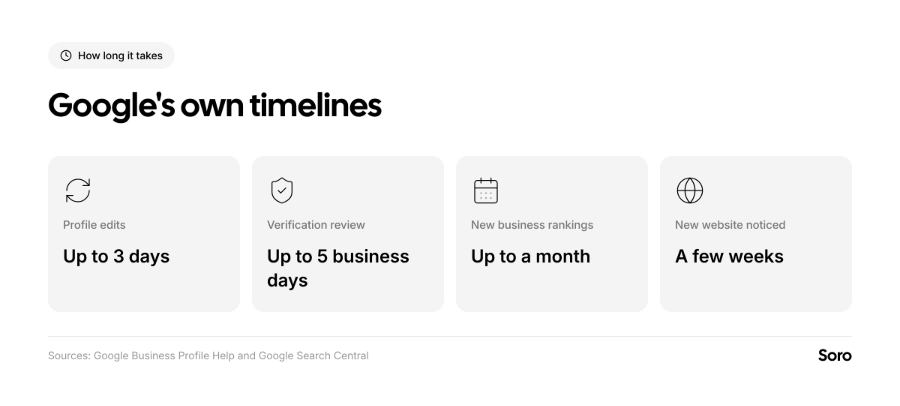
You need to sign in, search “My business,” and look for a ‘Get Verified’ button. If you see one, click on it and complete the verification process. While it may take up to 5 business days, that’s a must-do in order to get shown. Our guide to verifying your Google Business Profile covers every method.
2. Your Profile is Suspended or Disabled
If your GBP happens to break Google’s guidelines, it can get disabled and/or suspended, meaning it won’t show to other users until you resolve the issue. If this happens, you get a notification in the Google Account to which the business belongs.
Immediately try to fix whatever caused the infringement. Common causes include: extra keywords in the business name, false advertising, incentivizing reviews, etc. Once fixed, use Google’s appeal tool.
3. There's a Duplicate Listing
You may only have one profile per business. If Google flags a duplicate, it won’t show on Google Search or Google Maps. This is most common in situations when a previous owner, an agency, or the same owner made a past attempt and even accidentally created a second listing. If someone else owns the verified profile and you can’t reclaim it normally, request ownership through Google directly. If they don’t respond within a 3-day window, you will be able to claim the business.
4. Your Listing is New
Everything on Google needs time, especially new profiles. According to the search engine, rankings for new businesses take up to a month to appear in SERPs. If you verified last week, wait a bit longer, and don’t change anything or go into too much detail troubleshooting “why isn't my business showing up on Google?”
5. Your Category or Details Are Wrong or Incomplete
If people find your business by name, but not by service, look at relevance. The choice of primary category for every GBP matters because it tells Google what you are. Experts also rank it as the top Map Pack Factor, according to Whitespark's 2026 Local Search Ranking Factors survey.
To add to that, Google itself claims that the most likely top results are businesses with complete and accurate information. So always pick the most specific category and fill in the services you also provide. Don’t forget to add correct working hours and HQ photos from your work, premises, equipment, etc.
Finally, there’s keeping the profile active. Our Google Business Profile optimization checklist covers each field. An outdated or inactive profile is easy to overlook, while an active one stays competitive 365 days a year. If finding time for updates is the bottleneck, Soro Local can handle the load. The tool connects to your Google Business Profile and automatically publishes posts on a regular basis while also replying to new reviews.
6. You're Searching from Too Far Away
Distance is one of three pillars of local ranking on Google, so results vary depending on the searcher’s location. If a customer doesn’t share where they are, Google uses what it can infer or already knows about their location.
The simplified explanation is this – you may rank well near your shop, but not all across the town or region. This is normal. Still, to confirm, check from a few local locations with your phone before deciding that something’s in need of a dire fix. Our guide to ranking higher on Google Maps explains how to track results and improve the positions for local searches.
7. Your Business isn't Eligible
To be eligible, your business must be able to “make in-person contact with customers during its stated hours”. Online-only businesses and lead generation companies, for example, aren’t eligible. If that’s you, focus on the website instead.
Why Isn’t My Website Showing Up on Google?
If everything seems to be fine with the profile, but the website never appears in SERPs, check whether Google has indexed your website. Search site:yourdomain.com on Google.
If nothing comes back, it means that Google hasn’t added your pages just yet, and you have your answer to: “Why is my business not showing up on Google?” The most common reasons for nothing showing up, according to Google itself, are:
- The website is too new. It can take multiple weeks before Google indexes a new site.
- No other sites link to you. This means that Google hasn’t found you yet.
- Google can’t crawl it. Common reasons include a login page or a setting that blocks crawling. A more recent issue is if you only have content in images and video.
Add your site to Google Search Console and use the URL Inspection tool to see whether a page is indexed and to request indexing. Our SEO checklist for new websites covers the setup. Finally, if you have indexed pages that simply don’t rank well, that’s not a technical problem. That’s a content issue which you need to fix by upping the quality. Choose freelancers, allocate more time yourself, hire an agency, or use Soro to solve it.
Short Summary
If your business isn’t showing up on Google, first figure out whether the problem is in the Business Profile on Maps or your website in regular results. Profile causes include: missing verification, suspension, listing duplicates, newness of the listing, wrong categories, distance, or overall ineligibility. Get to know the fixes and then proceed.
On the other hand, website causes usually boil down to being too new, having no links, or being blocked from crawling. Run the 2-minute name test, fix what applies, and be patient, as results need time.
FAQ
I'm a Plumber - Why Doesn’t My Business Show Up On Google - What's Wrong?
First, search your business name and the city. If your profile doesn't appear, check the verification status, suspension status, and duplicates. If it appears by name but not for "plumber near me," check that your primary category is Plumber. Finally, results change with your location, so refine the service area and try to get more reviews.
My Google Listing is Verified but Doesn’t Appear on Maps – Why?
The most common causes include suspension, a duplicate listing, a profile that’s too new (you’ll need to wait up to 30 days), an incomplete profile, or the wrong category. Check account notifications before concluding.
Why Does My Business Show Up for Some People but Not Others?
If you’re wondering this, it’s because distance is a ranking factor. People closer to you are more likely to see the listing.