
An SEO report template is the format you use to summarize a site's organic search performance and the work behind it. Usually monthly, usually for a client, a manager, or yourself. The good ones are short, honest, and end with a clear plan for what's next. The bad ones are twenty pages of pasted screenshots that nobody opens again.
Before we built Soro, we ran an SEO agency for a couple of years. Every month, every client got a report from us. We tried the long format first: twenty-page deliverables with a glossary at the back, a methodology sidebar, and three different dashboards stitched together. They looked like work. They went into folders that never got opened.
After enough end-of-months spent rebuilding the same charts from scratch, we landed on the one-page SEO report template below. Three numbers, three wins, two or three concerns, three actions for next month. That was the report we sent for the rest of the agency's life, and it's the same structure we still use today. The only difference now is that we let Soro generate the first draft automatically and just review what it sends us.
This is the template, exactly as we used to write it.
The template
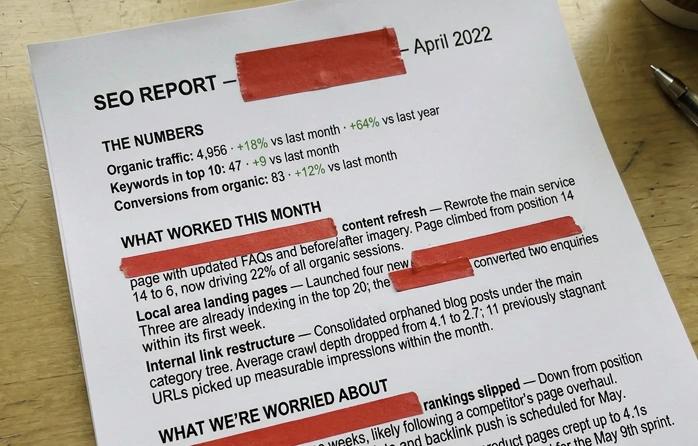
SEO REPORT — [Site or client name]   ·   [Month YYYY]

────────────────────────────────────────────
THE NUMBERS
────────────────────────────────────────────
Organic traffic:          [4,956]   +18% vs last month   +64% vs last year
Keywords in top 10:       [47]      +9 vs last month
Conversions from organic: [83]      +12% vs last month

────────────────────────────────────────────
WHAT WORKED THIS MONTH
────────────────────────────────────────────
1. [Win — what we did, and what it did]
2. [Win]
3. [Win]

────────────────────────────────────────────
WHAT WE'RE WORRIED ABOUT
────────────────────────────────────────────
1. [Concern — what dropped or broke, and what's next]
2. [Concern]

────────────────────────────────────────────
THREE THINGS WE'RE DOING NEXT MONTH
────────────────────────────────────────────
1. [Action]   ·   Owner: [name]   ·   By: [date]
2. [Action]   ·   Owner: [name]   ·   By: [date]
3. [Action]   ·   Owner: [name]   ·   By: [date]
That's the whole report. About fifteen lines once it's filled in. Copy it into a Google Doc, a Notion page, or a Slack message. It doesn't need a designer, and it doesn't need a dashboard tool unless you're managing more than a couple of sites.
The rest of this article is just how we filled each section in honestly, what we left out, and what eventually pushed us to stop building these by hand.
The three numbers
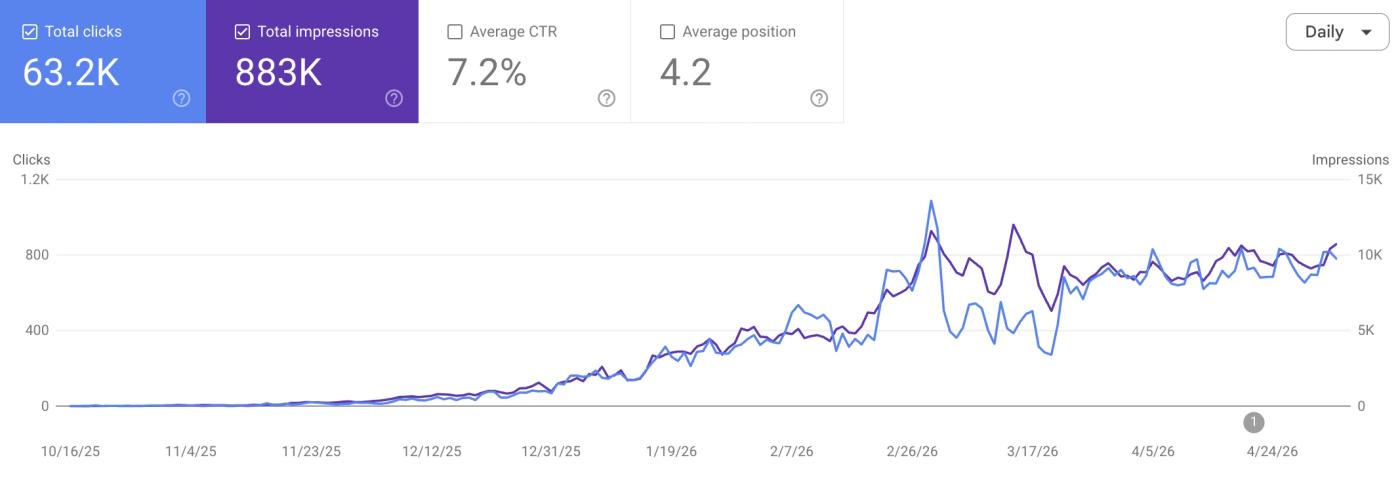
Pick the three metrics that actually move the business and put them at the top. For most clients we worked with, that meant organic traffic, the count of keywords ranking in the top 10, and conversions from organic search.
Always write the number with the change attached. "4,956 sessions" tells you nothing on its own. "4,956 sessions, +18% vs last month" tells you almost everything you need to know in eight words. If there's room for one more delta, year-over-year is the most useful, because it strips out seasonality and shows whether this month is a real improvement or just the calendar.
Things we kept out of this section, even when clients asked: pageviews (less meaningful than sessions for SEO), bounce rate (the GA4 version is misleading enough that arguing about it isn't worth the time), and total backlink count. Total backlinks is a vanity number. One referring domain can hand you two hundred links from the same site and that's still one source of authority. Track referring domains instead, in the concerns section if anything notable changed.
What worked this month
We wrote wins as full sentences, not as a bullet list of metrics. The point isn't "page X got 8% more traffic." It's "the comparison post we shipped on March 12 ranked #4 within three weeks, brought in 412 sessions, and produced one trial signup."
Three wins was about right. With ten, you start calling things wins that aren't really wins. You're padding to make the report look fuller. With genuinely zero, the report has to say so plainly, and the concerns section needs to do more work that month.
A useful test for each entry: can you draw a line from something you did to something that moved? If you can't, it probably belongs in a "things that happened" log somewhere, not in the wins section.
What we're worried about
This is the section that built trust over time. We learned the hard way that skipping it once made clients wonder what we were hiding the next month.
What goes here: traffic drops on important pages, rankings that fell after a Google update, indexing problems, a conversion rate that softened, links lost from authoritative domains. Anything that, if a client spotted it themselves later, would make them feel like the report wasn't honest.
You don't need to have a fix lined up to flag a concern. You just need to name it and say what comes next. Something like "/pricing dropped from position 4 to 11 after Google's March core update. We're digging into the SERP shift this week and will have a recommendation in the next report" was a perfectly fine entry. Hiding the drop and hoping it bounced back the following month never went well for us.
Two or three concerns a month is the normal range. If you have five every single report, the document should say something about that pattern out loud. Usually it means the strategy needs a real conversation, not another monthly update.
Three things we're doing next month
Every report ended with three specific actions. Each one had an owner and a deadline.
Generic recommendations didn't count. "Improve internal linking" wasn't an action. "Add internal links from /blog/seo-content-strategy and /blog/how-to-do-seo-yourself into the new keyword research post by May 17, Filip" was. The version that actually got done was the one specific enough to put on someone's calendar.
Why three? Because three was roughly what got done in a month when other work happened in parallel. Write seven and you'd ship three properly, two badly, and two would roll forward into next month's report unchanged. By the third month in a row with the same unfinished items, the document stopped feeling credible, and you could see the client read it less carefully each time.
If something from last month didn't ship, we said so explicitly. Either it carried forward with a reason, or it got dropped. Pretending it never existed was always the worst option.
What we left out
Almost everything else.
We dropped the methodology section, the glossary, the industry benchmarks chart, the full export of every keyword the site ranked for, the device breakdown, and any chart that had looked the same for three months without driving a single decision. They made the report look thorough. They didn't change anything anyone would do.
When clients wanted the underlying data, we linked out to it. A Google Sheet of every keyword, a Looker Studio dashboard with the full traffic breakdown, an Ahrefs export of all backlinks. Linked, not pasted into the report. The body of the document only contained things that changed a decision.
The honest test we used for any chart, table, or paragraph: if I cut this, does anything happen? If the answer was "no," it got cut.
How we filled it out
With the template saved and analytics in reasonably good shape, the actual filling-out was about half an hour:
- Pull the three headline numbers from Search Console and whatever the client used for conversions. About 5 minutes.
- Open last month's report. Look at the action list. Mark what shipped and what didn't. About 5 minutes.
- Look at top pages, top gainers, and top decliners for the period. Pick three wins and two or three concerns. Write them as sentences, not metrics. About 10 minutes.
- Decide on the three biggest priorities for next month and write them as actions with owners and deadlines. About 10 minutes.
When it took three hours instead, the bottleneck was almost never the template. It was that the data lived in too many places, or that the team hadn't agreed on what counted as a win that month. Both were worth fixing once.
Why we don't fill it in by hand anymore
One client, monthly: this was honestly fine. Pleasant once we had a rhythm.
Five clients, monthly: half a working day, every month, before any actual analysis happened. By the third month we were doing them late on the last Friday because we kept putting it off.
Ten clients was where it got bad. Half a week, every month, just on reports. We were spending more time writing about SEO work than doing the SEO work.
That ratio was the thing that pushed us to start automating. We didn't set out to build a product. We set out to stop spending three days a month on documents we could see were 80% mechanical and 20% actual judgement. The mechanical part was the obvious thing to hand over.
Soro is what came out of that. It generates this exact report structure for every site we run: pulls the headline numbers from Search Console and analytics, drafts the wins and concerns based on what actually moved that month, and surfaces three priority actions for next month based on the data and what's already on our running action list. We open the draft on the 1st, spend ten or fifteen minutes editing, sign it off, and it's done.
If you're running one or two sites, the manual template above is honestly all you need. If you're past three, automated reporting is worth a serious look. The math gets compelling fast, and the time saved compounds across every site you add.
A few mistakes we made
The patterns that came up over and over:
Reporting effort instead of outcomes. "Published 8 articles, built 12 backlinks, ran a technical audit" is an activity log. Useful internally; not a client report. Our worst-performing reports were the ones that read like timesheets.
Burying bad news. If something dropped, the headline numbers should say so. We learned that hiding a decline on page fourteen was the fastest way to lose a client, because they'd find it themselves and lose trust in the rest of the document at the same time.
Action items that weren't actually actions. "Improve content quality." "Optimize for voice search." Those can mean anything, which means in practice they meant nothing. Specific page, specific change, specific person, specific date. Every time.
Reports that ignored last month's report. Every action from the previous month had to appear in the next one: done, in progress, or dropped with a reason. Reports without that continuity were reports clients eventually stopped reading.
Reusing last month's writeup. Embarrassingly common. If the wins paragraph could be copy-pasted from last month with the numbers swapped, we weren't analysing the data, we were filing it.
Bottom line
Most SEO reports try to be impressive. The ones that actually got read at our agency were short, honest, and ended with a clear plan for the month ahead.
Copy the template up top into whatever tool you already write in. Fill it in for one month. See whether the people you send it to read it differently than they read your last report.
That's really the whole experiment. Worked for us for years. Still works. We just don't write the first draft ourselves anymore.
Further reading:
- SEO Automated Reporting: Save Hours Every Week — How we took the manual work out of this entirely
- SEO Metrics That Matter (And Which to Ignore) — A longer take on what to track
- Measuring SEO ROI — Tying organic results to revenue
- Why Your SEO Isn't Working — When the report is fine but the program isn't